
【台灣微笑單車】YouBike Rental Guide

This post contains affiliate links, meaning EVERLASTYING will earn a commission if you purchase through our link at no extra cost.
Read my disclosure for more information. I appreciate your support 🤍
One of my favorite ways to explore a new city is by riding a bike. Not only does biking allow you to travel quickly, but you’re still able to appreciate your surroundings at a leisurely pace.
In this blog post, I will dive into Taiwan's most popular YouBike system, safety tips, pricing in different cities and counties, renting YouBikes as a foreigner with or without a local Taiwanese SIM card, and how to return your YouBike without struggling like a foreigner.
what's a YouBike?
YouBike, also known as UBike, is Taiwan's massive bike-sharing network. Launched in 2009 and initially located only in Taipei, it became a favorite way for locals to get around the city.
Since then, Taiwan has expanded its bike stations to more cities across the country, making it easier for more people to access YouBikes. You can now find YouBike stations in major areas such as New Taipei City, Taipei City, Taoyuan City, Hsinchu County, Hsinchu City, Hsinchu Science Park, Miaoli City, Taichung City, Chiayi, Tainan City, Kaohsiung City, Pingtung County, and Taitung City. This expansion allows you to explore these cities at your own pace.
YouBike versions explained
Taiwan’s public bike system has gone through a massive glow-up over the past few years.

🟡 YouBike 1.0
The original orange-and-yellow bikes that many travelers remember are now almost fully phased out in most cities. You’ll rarely see them in major areas anymore.
⚪ YouBike 2.0
In 2020, YouBike launched its new bikes called YouBike 2.0. This is the standard version you’ll find across Taiwan today.
YouBike 2.0 bikes are yellow and white, dock at smaller modular stations, and are fully integrated with the YouBike app for smoother rentals and real-time availability tracking. They also feature built-in solar-powered lights that automatically turn on at night — super helpful for evening rides.
The system is more flexible than 1.0, and stations are more widely distributed, especially in cities like Taipei and Taichung.
⚡ YouBike 2.0E (Electric)
If you want less pedaling and more cruising, the 2.0E electric version is the way to go.
These bikes are orange and white and provide electric pedal-assist (up to around 25–30 km/h, depending on conditions). They’re especially helpful in hillier areas or if you’re riding longer distances.
Pricing is higher than the standard bike, typically starting at NT$20 per 30 minutes for the first two hours (prices vary slightly by city). You’ll mainly find 2.0E bikes in larger cities like Taipei, New Taipei, Taoyuan, and Kaohsiung.
before you ride
Taiwan has traffic like any major city — but Taipei and most large cities have designated bike lanes, especially along rivers and main roads.
In smaller cities, you may need to bike on the side of the street. Sidewalks are for pedestrians.
Follow traffic rules, signal when turning, and ride predictably. Helmets aren’t required, but if you’re not confident in city traffic, renting one isn’t a bad idea.
💡 PRO TIP
If you see a YouBike with its seat backward, it's broken! Leave it for the mechanics to fix and find another bike. If you find a YouBike broken, also turn the seat backward.
YouBike pricing
YouBike is one of the cheapest ways to get around Taiwan.
Standard YouBike 2.0 pricing usually starts at NT$10–20 per 30 minutes for the first 2 hours (varies slightly by city). After that, the rate increases gradually.
There is a minimum charge per rental — even if you ride under 30 minutes.
Electric YouBike 2.0E bikes cost more and are priced separately.
Still? Way cheaper than taxis, Uber, or even some MRT rides.
YouBike App (optional)

The YouBike app adds even more convenience to your ride.
Find nearby stations, check bike availability, and your payment options.
This app is a lifesaver if you don't have a local Taiwanese SIM card or EasyCard.
how to rent YouBikes
with or without a local sim
You can rent a YouBike in two easy ways:
✔ With an EasyCard (most convenient if you have one)
✔ With the YouBike 2.0 app (great for travelers without a local SIM)
Let’s break it down.

Esther Bunny EasyCard from 711
Option 1: Rent with an EasyCard
An EasyCard is basically your Taiwan life card. It works for MRT, buses, trains, and YouBike — so you’ll be using it constantly.
Where to get an EasyCard?
You can easily obtain an EasyCard at any 7-Eleven, FamilyMart, or MRT station.
If you're looking for cute EasyCards or iPasses (which are similar to EasyCards), you can find them at small shops in Taipei, as well as at 7-Eleven or FamilyMart locations. For regular EasyCards, you should pick them up at MRT stations.
For added convenience, you can also pre-order an EasyCard online and collect it at the airport upon your arrival!
Step 1: Activate Your EasyCard
Before using it for YouBike, you must register it on the YouBike website or through the YouBike 2.0 app.
This step is required — otherwise it won’t unlock bikes.
Step 2: Rent Your Bike
Go to any YouBike station and choose a bike.
Tap your EasyCard on the bike’s screen.
Keep it there until you see “Pull the bike out backward.”
Remove your card, pull the bike out, and ride away.
Done. Super simple.


Option 2: rent with the YouBike 2.0 App (no local SIM needed)
No Taiwanese SIM? Totally fine.
You can register through the app using an email address or a foreign phone number.
How to rent using the App
Download the YouBike app before your trip.
Create an account and add your credit card.
At the station, choose a bike and turn on Bluetooth.
Press the red button that says “Rent via QR code.”
Scan the QR code in the app.
When the screen says “Pull the bike out backward” and the green light flashes — you’re good to go.
Pro tip: The app also helps you find nearby stations and check bike availability, which is incredibly useful in busy areas.
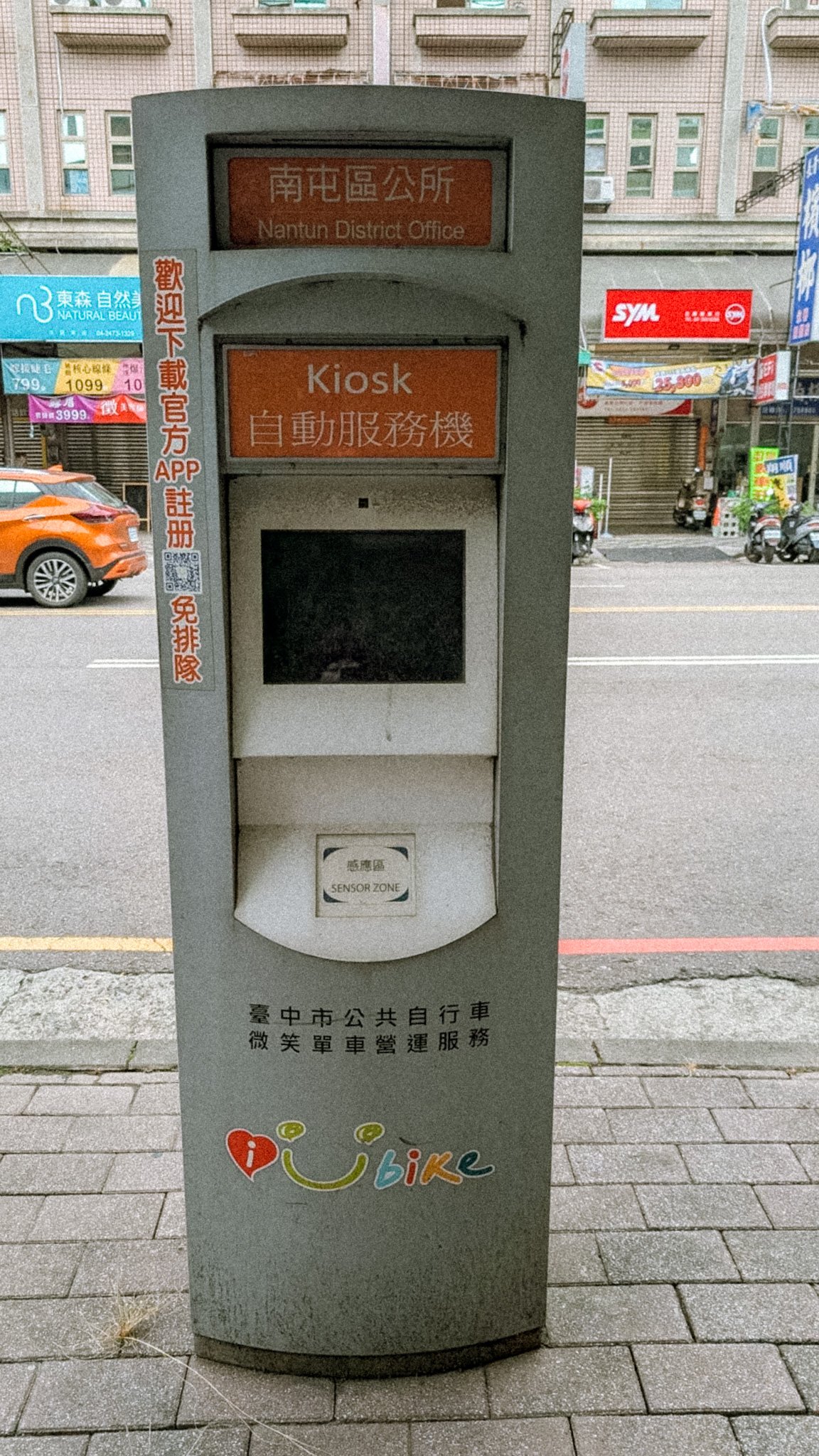
❌ What about kiosks? (outdated)
YouBike kiosks are only for single rentals of YouBike 1.0, which is disappearing across Taiwan.
If you find a kiosk, you can still:
✅ Choose a language
✅ Select “Rent a YouBike”
✅ Pay for a single ride with a credit card
But most new stations no longer have kiosks, so it’s best to use the YouBike app or an EasyCard.
returning your YouBike
You can use the YouBike app, which helps you locate open stations with available docks. Find any open YouBike station and simply dock your bike in an empty spot. Make sure it's secure and wait for the screen to display "Thank You" followed by "Tap Your EasyCard".
FAQ
Can foreigners use YouBike in Taiwan?
Yes! Foreigners can rent YouBikes with or without a local SIM card. While the process may require a bit of setup, it’s an excellent way to explore Taiwan like a local.
How can I rent a YouBike without a local SIM card?
Here’s a simple way to rent YouBikes in Taiwan without a local SIM:
1. Download the YouBike 2.0 app.
2. Register with your personal information and a credit card.
3. Make sure you have internet access to scan the QR code on the bike’s screen to unlock it.
Alternatively, you can also use a station kiosk to input your credit card details and unlock your chosen bike.
How do I pay for a YouBike in Taiwan?
Here’s how you can pay for a YouBike in Taiwan with or without a local SIM:
Without a local SIM: Use the YouBike 2.0 app to register for a single ride and pay with your credit card.
With a local SIM: Purchase an EasyCard at convenience stores (7-Eleven, FamilyMart, etc.), load money onto it, and simply tap the card on the bike’s screen to unlock the bike.
How do I return my YouBike?
Find an empty YouBike docking station. Push the bike into the dock and check the bike’s screen to confirm it has been successfully returned. You’ll also receive a confirmation notification in the app or hear a cute beep at the dock.
check out my Taiwan travel vlog
YOU MIGHT ALSO LIKE



Last Updated: 07.13.2026
Planning a trip to Sun Moon Lake? This guide covers must-see spots, where to stay, how to get around, and insider tips so you can experience Taiwan’s most iconic lake without the guesswork.